A gentle check-in
Your previous entries help estimate when to ask. Choose a time that suits you, or turn reminders off.
 Moontide月汐
A little attention. A little room to breathe.
No need to remember to open an app. Around your expected period, a gentle question arrives on your Dynamic Island or Lock Screen. Tap to log in Apple Health, with an occasional mood check-in and a kind word.
Version 1.0 is free, with no in-app purchases. A download link will be added after App Store availability.
9:41
A little space for today
Ready for today's check-in?
Less to remember. More room to breathe.
Your previous entries help estimate when to ask. Choose a time that suits you, or turn reminders off.
Log a start on the Dynamic Island, Lock Screen Live Activity or Apple Watch, with Undo for mistakes. Requires iOS 18+ and watchOS 11+ for the companion; Dynamic Island needs a supported iPhone.
Records are written to Apple Health. Apple manages synchronization between your devices; you control access.
Manual logging means remembering, opening an app and finding the entry. Moontide brings the question to your Dynamic Island or Lock Screen. Answer with a tap; confirmation follows a successful save, with Undo for mistakes.
Automatic starts depend on system permission, push service and connectivity. Without remote push, open the app after reminder time during your predicted window. Notifications and manual logging remain alternatives.
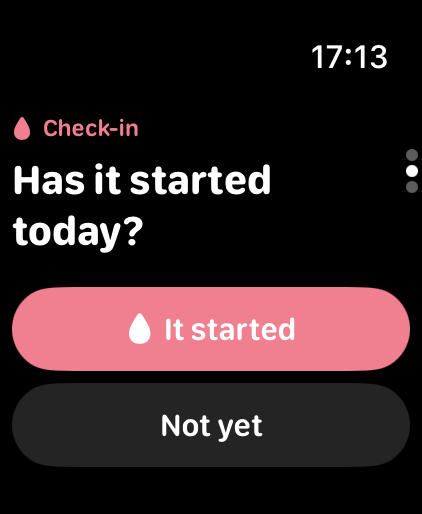
Apple Watch
Respond in the watch app or a notification. Health access is separate on each device; Apple Health syncs entries and may take a little time.
No Moontide account. Health records, moods and answers stay on device and in Apple Health. Optional pushes use installation identifiers, tokens and scheduling metadata; timing may imply a predicted cycle window. Lock-screen wording is discreet by default. Read the privacy notice for details.
Privacy ↗Version 1.0 is free, with no account or in-app purchases.
No. Estimates only time check-ins. They are not for contraception, diagnosis or treatment and do not identify a precise ovulation date.
iOS 18 or later. Dynamic Island requires a compatible iPhone; other supported iPhones use Lock Screen Live Activities. The optional Apple Watch companion needs watchOS 11 or later.
Manage or delete period and mood entries in Apple Health; uninstalling does not delete Health records. Turning off reminders or Live Activities unregisters the server plan when the app can run and connect. Remaining plans expire within 45 days; cleanup and recovery copies may last longer as explained in the privacy notice.
Version 1.0 is free, with no in-app purchases. Contact support for help with Health permissions, reminders or using Moontide.
Moontide does not provide diagnosis, treatment or contraceptive advice. Cycle estimates only guide the timing of check-ins.